stomers.Country <> ''''USA'''' AND Customers.Country <> ''''Mexico''''
GROUP BY Customers.ContactName, Customers.Address, Customers.City,
Customers.Country
HAVING (SUM([Order Details].UnitPrice*[Order Details].Quantity))>1000
ORDER BY Customer DESC, Address DESCThe paging stored procedure call that returns the second page looks like this EXEC ProcedureName
/* Tables */
''''Customers
INNER JOIN Orders ON Customers.CustomerID = Orders.CustomerID
INNER JOIN [Order Details] ON Orders.OrderID = [Order Details].OrderID'''',
/* PK */
''''Customers.CustomerID'''',
/* ORDER BY */
''''Customers.ContactName DESC, Customers.Address DESC'''',
/* PageNumber */
2,
/* Page Size */
10,
/* Fields */
''''Customers.ContactName AS Customer,
Customers.Address + '''''''', '''''''' + Customers.City + '''''''', '''''''' + Customers.Country
AS Address,
SUM([Order Details].UnitPrice*[Order Details].Quantity) AS [Total money spent]'''',
/* Filter */
''''Customers.Country <> ''''''''USA'''''''' AND Customers.Country <> ''''''''Mexico'''''''''''',
/*Group By*/
''''Customers.CustomerID, Customers.ContactName, Customers.Address,
Customers.City, Customers.Country
HAVING (SUM([Order Details].UnitPrice*[Order Details].Quantity))>1000''''
Note that in the original query, aliases are used in the ORDER BY clause. You can''''t do that in paging procedures, because the most time-consuming task in all of them is skipping rows preceding the starting row. This is done in various ways, but the principle is not to fetch all the required fields at first, but only the PK column(s) (in case of RowCount method the sorting column), which speeds up this task. All required fields are fetched only for the rows that belong to the requested page. Therefore, field aliases don''''t exist until the final query, and sorting columns have to be used earlier (in row skipping queries).
The RowCount procedure has another problem, it is generalized to work with only one column in the ORDER BY clause. The same goes for Asc-Desc and Cursor methods, though they can work with several ordering columns, but require that only one column is included in the PK. I guess this could be solved with more dynamic SQL, but in my opinion it is not worth the fuss. Although these situations are highly possible, they are not that frequent. Even if they are, you can always write a separate paging procedure following the principles above.
Performance Testing
I used these 4 methods in my tests, if you have a better one, I’d be glad to know about it. Nevertheless, I wanted to compare these methods and measure their performance. The first thought was to write an ASP.NET test application with paged DataGrid and then measure page response. Still, this wouldn’t reflect the true response time of the stored procedures, so the console application seemed more appropriate. I also included a web application, not for performance testing, but rather as an example of how DataGrid custom paging works with these stored procedures. They are both incorporated in the PagingTest Solution.
I used the auto generated large table for my tests and inserted around 500 000 records in it. If you don’t have a large table to experiment on, you can download the script for a table design and stored procedure for data generation here. I didn''''t want an identity column for my PK, I used the uniqueidentifier instead. If you''''ll use this script, you may consider to add an identity after you generate the table. It will add numbers sorted by PK and you''''ll have an indication that correct page is fetched when you call a paging procedure with PK sorting.
The idea behind performance testing was to call a specific stored procedure many times through a loop and then measure the average response time. Also, in order to remove caching deviations and to model the real situation more accurately – multiple calls to a stored proc with the same page fetched each time seemed inappropriate. Thus, a random sequence of the same stored procedure with a set of different page numbers was required. Of course, a set of different page numbers assumes fixed number of pages (10 – 20) where each page would be fetched many times, but in a random sequence.
It’s not hard to notice that response times depend on the distance of the fetched page from the beginning of the resultset. The further the starting record is, more records need to be skipped. This is the reason I didn’t include first 20 pages in my random sequence. Instead I used the set of 2N pages. A loop was set to a (number of different pages)*1000. So, every page was fetched around 1000 times (more or less because of a random distribution).
ResultsHere are the results I''''ve got - Paging_Results (MS Excell file)
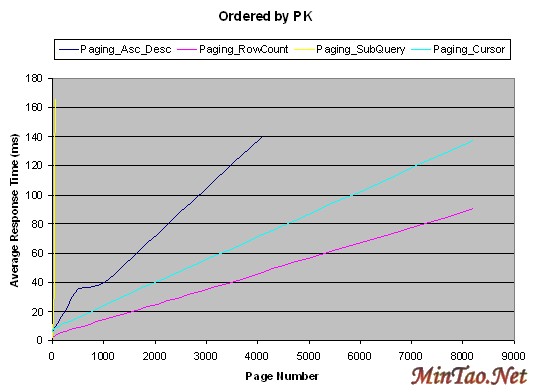

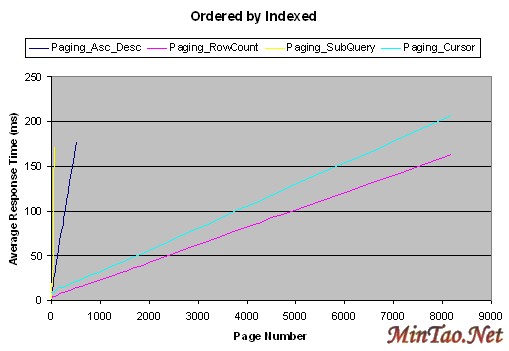

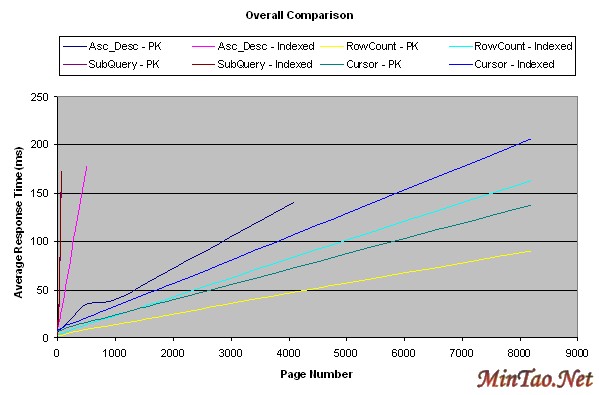
Conclusion
The methods performed in the following order, starting from the best one - RowCount, Cursor, Asc-Desc and Subquery. The behavior in the lower portion was especially interesting, because in many real situations you''''ll browse beyond the first five pages rarely, so the Subquery method might satisfy your needs in those cases. It all depends on the size of your resultset and the prediction how frequently will the distant pages be fetched. You might use the combination of methods as well. As for myself, I decided to use the RowCount method wherever possible. It beaves quite nice, even for the first page. The "wherever possible" part stands for some cases where it''''s hard to generalize this method, then I would use the Cursor (possibly combined with the SubQuery for the first couple of pages).
Update 2004-05-05
The main reason I wrote this article was the feedback from the vast programming community. In a couple of weeks I''''ll be starting work on a new project. The preliminary analysis showed that there''''s going to be a couple of very large tables involved. These tables will be used in many complex joined queries and their results will be displayed in the ASP.NET application (with sorting and paging enabled). That''''s why I invested some time in research and pursue for the best paging method. It wasn''''t just the performance that interested me, but also the usability and maintainability.
Now the invested time has started to pay off already. You can find a post by C. v. Berkel below (many thanks) in which he found a flaw in the RowCount method. It won''''t work correctly if the sorting column is not unique. The RowCount method performed the best in my tests, but now I am seriously considering not using it at all. In most cases sorting columns (besides the PK) won''''t be unique. This leaves me with the Cursor method as the fastest and applicable to most situations. It can be combined with the SubQuery method for the first couple of pages and possibly with the RowCount method for unique sorting columns.
Another thing which may be worth mentioning is that there''''s a tiny flaw in the Asc-Desc method as well. It always returns the PageSize number of records for the last page and not the actual number (which may be lower than the PageSize). The correct number can be calculated but since I don''''t intend to use this procedure (because of how it performed), I didn''''t want to improve it any further.
Jasmin Muharemovic
Click here to view Jasmin Muharemovic''''s online profile.
Other popular articles:
- Applying Robustness Analysis on the Model–View–Controller (MVC) Architecture in ASP.NET Framework, using UML
This article will enhance your vision on the usage of Robustness Analysis in conjunction with Model View Controller, using UML with application in ASP.NET. This article is a sequel to my articles on Architecture and Design with ASP.NET.
- SqlWhereBuilder ASP.NET Server Control
A user interface web control for building conditions suitable for use in a SQL statement.
- ASCII art with C#
About writing an image to ASCII converter.
- NoSpamEmailHyperlink: 4. Design-Time Functionality
Adding full design time functionality to your custom control in a few easy steps.
上一页 [1] [2] |


