打印本文 打印本文 关闭窗口 关闭窗口
Messagebox.Show()常用参数用法实例详解
作者:佚名  文章来源:本站原创  点击数2142  更新时间:2012/5/29 13:13:50  文章录入:mintao  责任编辑:mintao
Messagebox.Show()常用参数用法实例详解

声明:IWin32Window owner   ,  HelpNavigator navigator ,    string keyword

               上面的三个参数类型不是很了解。没有做讨论。

       等以后了解多了,再做补充。。。


      下面讨论的一些常用参数,在平时使用,已经绰绰有余了。。。 

      下面是详细的代码  。


using System;
using System.Collections.Generic;
using System.ComponentModel;
using System.Data;
using System.Drawing;
using System.Linq;
using System.Text;
using System.Windows.Forms;

namespace 对话框_终极版
{
    public partial class Form1 : Form
    {
        public Form1()
        {
            InitializeComponent();
        }

        private void button1_Click(object sender, EventArgs e)
        {
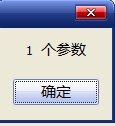
            MessageBox.Show("  1  个参数 "
                );
        }


        private void button2_Click(object sender, EventArgs e)
        {
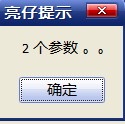
            MessageBox.Show(" 2 个参数。。 ",
                                 "亮仔提示"
                                 );
        }


        private void button3_Click(object sender, EventArgs e)
        {
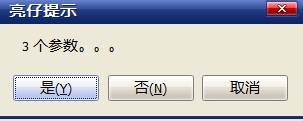
            MessageBox.Show(" 3 个参数。。。 ",
                                " 亮仔提示",
                                MessageBoxButtons.YesNoCancel
                                );
        } 


        private void button4_Click(object sender, EventArgs e)
        {
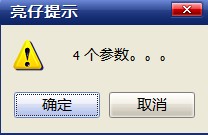
            MessageBox.Show(" 4 个参数。。。  ",
                                " 亮仔提示",
                                MessageBoxButtons.OKCancel,
                                MessageBoxIcon.Warning
                                );
        }


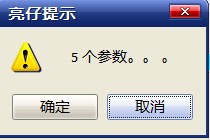
        private void button5_Click(object sender, EventArgs e)
        {
            MessageBox.Show(" 5 个参数。。 。  ",
                                " 亮仔提示",
                                MessageBoxButtons.OKCancel,
                                MessageBoxIcon.Warning,
                                MessageBoxDefaultButton.Button2
                                );
        }


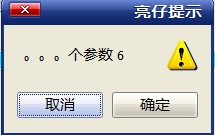
        private void button6_Click(object sender, EventArgs e)
        {
            MessageBox.Show(" 6 个参数。。。  ",
                                " 亮仔提示",
                                MessageBoxButtons.OKCancel,
                                MessageBoxIcon.Warning,
                                MessageBoxDefaultButton.Button2,
                                MessageBoxOptions.RtlReading      //ServiceNotification//.RightAlign   // 标题向右对齐。
                                );

        }


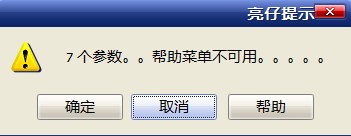
        private void button7_Click(object sender, EventArgs e)
        {
            MessageBox.Show(" 7 个参数。。帮助菜单不可用。。。。。  ",
                                " 亮仔提示",
                                MessageBoxButtons.OKCancel,
                                MessageBoxIcon.Warning,
                                MessageBoxDefaultButton.Button2,
                                MessageBoxOptions.RightAlign,
                                true   // 标题向右对齐。。。。。
                                );

        }


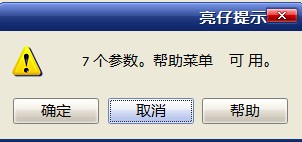
        private void button8_Click(object sender, EventArgs e)
        {
            MessageBox.Show(" 7 个参数。帮助菜单    可用。   ",
                                " 亮仔提示",
                                MessageBoxButtons.OKCancel,
                                MessageBoxIcon.Warning,
                                MessageBoxDefaultButton.Button2,
                               MessageBoxOptions.RightAlign  ,   // 要使用默认风格,此处参数可设为 0    
                                @"C:\Documents and Settings\Administrator\桌面\新建文本文档.txt"
                                );
        }


    }
}

打印本文 打印本文 关闭窗口 关闭窗口