|
转贴,仅引用了 FSO,PDF 格式可以自己写,就像标志语言:
Creating a PDF from a Stored Procedure
http://www.sqlservercentral.com/columnists/mivica/creatingapdffromastoredprocedure.asp
不愿注册就贴出来:
Creating a PDF from a Stored Procedure
Regular Columnist : M Ivica
Posted: 08/26/2003
More Articles From This Columnist
14089 Reads

Add Article to Your Virtual Briefcase (What is this?)
Article Rating  Total number of votes [183] Total number of votes [183]
This Content Sponsored by:
Is SQL the Center of your Universe?
SQLCentric is a comprehensive web-based network database monitoring and alert system. - brought to you by Pearl Knowledge Solutions, Inc.
http://www.pearlknows.com
This article explains how to create a a stored procedure that will in turn create a simple column based report in PDF without using any external tools or libraries (and their associated licensing costs!).
SQL2PDF makes a PDF report from text inserted in the table psopdf ( nvarchar(80) ). First a table named psopdf should be created.
CREATE TABLE psopdf (code NVARCHAR(80))
After that create the stored procedure SQL2PDF.
SQL2PDF.TXT
And table psopdf has to be filled with your data as shown in examples below.
At the end the stored procedure is called using the file name only (not extension).
EXEC sql2pdf ''''fileName''''
The result is in your C:\ directory.
EXAMPLE 1:INSERT psopdf(code) SELECT SPACE(60) + ''''COMPANY LTD''''
INSERT psopdf(code) SELECT SPACE(60) + ''''COMPANY ADDRESS''''
INSERT psopdf(code) SELECT SPACE(60) + ''''STREET NAME & No''''
INSERT psopdf(code) SELECT '''' ''''
INSERT psopdf(code) SELECT SPACE(34) + ''''BILL OF SALE''''
INSERT psopdf(code) SELECT '''' ''''
INSERT psopdf(code) SELECT ''''Product'''' + SPACE(10) + ''''Quantity''''
+ SPACE(10) + ''''Price'''' + SPACE(10) + ''''Total''''
INSERT psopdf(code) SELECT REPLACE(SPACE(56), '''' '''', ''''_'''')
INSERT psopdf(code) SELECT ''''Product1'''' + SPACE(9) + ''''10.00 ''''
+ SPACE(10) + ''''52.30'''' + SPACE(10) + ''''5230.0''''
INSERT psopdf(code) SELECT ''''Product2'''' + SPACE(9) + ''''2.00 ''''
+ SPACE(10) + ''''10.00'''' + SPACE(10) + '''' 20.0''''
INSERT psopdf(code) SELECT REPLACE(SPACE(56), '''' '''', ''''_'''')
INSERT psopdf(code) SELECT SPACE(50) + ''''5250.0''''
After INSERT call the stored procedure with file name demo2. EXEC sql2pdf ''''demo2''''
The result is in your C:\ directory.
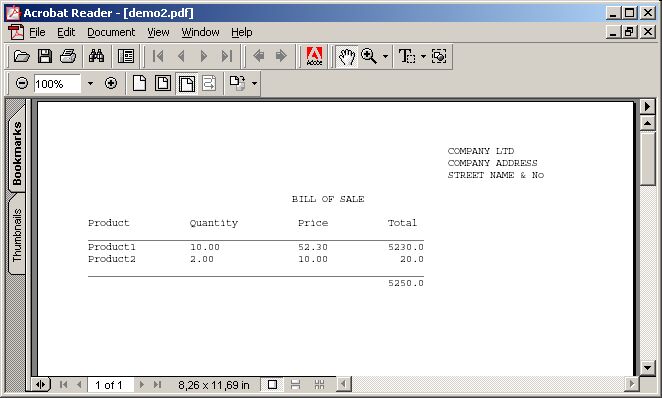
EXAMPLE 2:
Second example uses a database pubs. USE pubs
INSERT psopdf(code) SELECT t1.au_lname + '''' '''' + t1.au_fname + '''' '''' + t1.phone
+
'''' '''' + t1.address + '''' '''' + t1.city + '''' '''' + t1.state + '''' '''' + t1.zip FROM
authors t1, authors t2
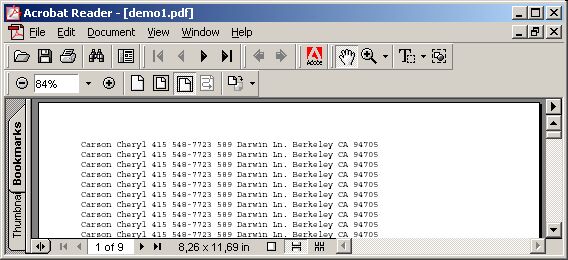
After INSERT call the stored procedure with file name demo1. EXEC sql2pdf ''''demo1''''
>The result is in your C:\ directory.
sql2pdf.txt -- DROP PROCEDURE sql2pdf
CREATE PROCEDURE sql2pdf
@filename VARCHAR(100)
AS
CREATE TABLE #pdf (idnumber INT IDENTITY(1,1)
,code NVARCHAR(200))
CREATE TABLE #xref (idnumber INT IDENTITY(1,1)
,code VARCHAR(30))
CREATE TABLE #text (idnumber INT IDENTITY(1,1)
,code VARCHAR(200))
DECLARE @end VARCHAR(7),
@beg VARCHAR(7),
@a1 VARCHAR(3),
@a2 VARCHAR(3),
@ad VARCHAR(5),
@cr VARCHAR(8),
@pr VARCHAR(9),
@ti VARCHAR(6),
@xstr VARCHAR(10),
@page VARCHAR(8000),
@pdf VARCHAR(100),
@trenutniRed NVARCHAR(200),
@rows INT,
@ofset INT,
@len INT,
@nopg INT,
@fs INT,
@ole INT,
@x INT,
@file INT,
@object INT
SELECT @pdf = ''''C:\'''' + @filename + ''''.pdf''''
SET @page = ''''''''
SET @nopg = 0
SET @object = 6
SET @end = ''''endobj''''
SET @beg = '''' 0 obj''''
SET @a1 = ''''<<''''
SET @a2 = ''''>>''''
SET @ad = '''' 0 R''''
SET @cr = CHAR(67) + CHAR(114) + CHAR (101) + CHAR(97) + CHAR(116) + CHAR (111) + CHAR(114)
SET @pr = CHAR(80) + CHAR(114) + CHAR (111) + CHAR(100) + CHAR(117) + CHAR (99 ) + CHAR(101) + CHAR(114)
SET @ti = CHAR(84) + CHAR(105) + CHAR (116) + CHAR(108) + CHAR(101)
SET @xstr = '''' 00000 n''''
SET @ofset = 396
INSERT INTO #xref(code) VALUES (''''xref'''')
INSERT INTO #xref(code) VALUES (''''0 10'''')
INSERT INTO #xref(code) VALUES (''''0000000000 65535 f'''')
INSERT INTO #xref(code) VALUES (''''0000000017'''' + @xstr)
INSERT INTO #xref(code) VALUES (''''0000000790'''' + @xstr)
INSERT INTO #xref(code) VALUES (''''0000000869'''' + @xstr)
INSERT INTO #xref(code) VALUES (''''0000000144'''' + @xstr)
INSERT INTO #xref(code) VALUES (''''0000000247'''' + @xstr)
INSERT INTO #xref(code) VALUES (''''0000000321'''' + @xstr)
INSERT INTO #xref(code) VALUES (''''0000000396'''' + @xstr)
INSERT INTO #pdf (code) VALUES (''''%'''' + CHAR(80) + CHAR(68) + CHAR (70) + ''''-1.2'''')
INSERT INTO #pdf (code) VALUES (''''%佑佑'''')
INSERT INTO #pdf (code) VALUES (''''1'''' + @beg)
INSERT INTO #pdf (code) VALUES (@a1)
INSERT INTO #pdf (code) VALUES (''''/'''' + @cr + '''' (Ivica Masar '''' + CHAR(80) + CHAR(83) + CHAR (79) + CHAR(80) + CHAR(68) + CHAR (70) + '''')'''')
INSERT INTO #pdf (code) VALUES (''''/'''' + @pr + '''' (stored procedure for ms sql pso@vip.hr)'''')
INSERT INTO #pdf (code) VALUES (''''/'''' + @ti + '''' (SQL2'''' + CHAR(80) + CHAR(68) + CHAR (70) + '''')'''')
INSERT INTO #pdf (code) VALUES (@a2)
INSERT INTO #pdf (code) VALUES (@end)
INSERT INTO #pdf (code) VALUES (''''4'''' + @beg)
INSERT INTO #pdf (code) VALUES (@a1)
INSERT INTO #pdf (code) VALUES (''''/Type /Font'''')
INSERT INTO #pdf (code) VALUES (''''/Subtype /Type1'''')
INSERT INTO #pdf (code) VALUES (''''/Name /F1'''')
INSERT INTO #pdf (code) VALUES (''''/Encoding 5'''' + @ad)
INSERT INTO #pdf (code) VALUES (''''/BaseFont /Courier'''')
INSERT INTO #pdf (code) VALUES (@a2)
INSERT INTO #pdf (code) VALUES (@end)
INSERT INTO #pdf (code) VALUES (''''5'''' + @beg)
INSERT INTO #pdf (code) VALUES (@a1)
INSERT INTO #pdf (code) VALUES (''''/Type /Encoding'''')
INSERT INTO #pdf (code) VALUES (''''/BaseEncoding /WinAnsiEncoding'''')
INSERT INTO #pdf (code) VALUES (@a2)
INSERT INTO #pdf (code) VALUES (@end)
INSERT INTO #pdf (code) VALUES (''''6'''' + @beg)
INSERT INTO #pdf (code) VALUES (@a1)
INSERT INTO #pdf (code) VALUES ('''' /Font '''' + @a1 + '''' /F1 4'''' + @ad + ''[1] [2] 下一页 | 








 注:本站部分文章源于互联网,版权归原作者所有!如有侵权,请原作者与本站联系,本站将立即删除! 本站文章除特别注明外均可转载,但需注明出处! [MinTao学以致用网]