|
source:
http://msdn.microsoft.com/msdnmag/issues/04/09/DataPoints/default.aspx
begin:
Download the code for this article: DataPoints0409.exe (148KB)
One of the key features of the ADO.NET DataSet is that it can be a self-contained and disconnected data store. It can contain the schema and data from several rowsets in DataTable objects as well as information about how to relate the DataTable objects—all in memory. The DataSet neither knows nor cares where the data came from, nor does it need a link to an underlying data source. Because it is data source agnostic you can pass the DataSet around networks or even serialize it to XML and pass it across the Internet without losing any of its features. However, in a disconnected model, concurrency obviously becomes a much bigger problem than it is in a connected model.
In this column, I''''ll explore how ADO.NET is equipped to detect and handle concurrency violations. I''''ll begin by discussing scenarios in which concurrency violations can occur using the ADO.NET disconnected model. Then I will walk through an ASP.NET application that handles concurrency violations by giving the user the choice to overwrite the changes or to refresh the out-of-sync data and begin editing again. Because part of managing an optimistic concurrency model can involve keeping a timestamp (rowversion) or another type of flag that indicates when a row was last updated, I will show how to implement this type of flag and how to maintain its value after each database update.
Is Your Glass Half Full?
There are three common techniques for managing what happens when users try to modify the same data at the same time: pessimistic, optimistic, and last-in wins. They each handle concurrency issues differently.
The pessimistic approach says: "Nobody can cause a concurrency violation with my data if I do not let them get at the data while I have it." This tactic prevents concurrency in the first place but it limits scalability because it prevents all concurrent access. Pessimistic concurrency generally locks a row from the time it is retrieved until the time updates are flushed to the database. Since this requires a connection to remain open during the entire process, pessimistic concurrency cannot successfully be implemented in a disconnected model like the ADO.NET DataSet, which opens a connection only long enough to populate the DataSet then releases and closes, so a database lock cannot be held.
Another technique for dealing with concurrency is the last-in wins approach. This model is pretty straightforward and easy to implement—whatever data modification was made last is what gets written to the database. To implement this technique you only need to put the primary key fields of the row in the UPDATE statement''''s WHERE clause. No matter what is changed, the UPDATE statement will overwrite the changes with its own changes since all it is looking for is the row that matches the primary key values. Unlike the pessimistic model, the last-in wins approach allows users to read the data while it is being edited on screen. However, problems can occur when users try to modify the same data at the same time because users can overwrite each other''''s changes without being notified of the collision. The last-in wins approach does not detect or notify the user of violations because it does not care. However the optimistic technique does detect violations.
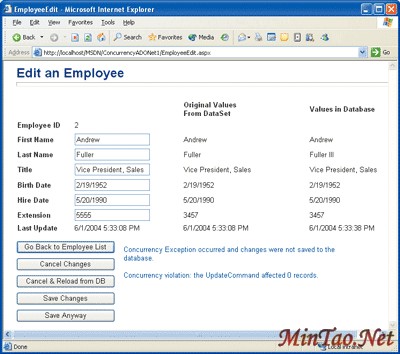
Figure 1 Concurrency Violation
In optimistic concurrency models, a row is only locked during the update to the database. Therefore the data can be retrieved and updated by other users at any time other than during the actual row update operation. Optimistic concurrency allows the data to be read simultaneously by multiple users and blocks other users less often than its pessimistic counterpart, making it a good choice for ADO.NET. In optimistic models, it is important to implement some type of concurrency violation detection that will catch any additional attempt to modify records that have already been modified but not committed. You can write your code to handle the violation by always rejecting and canceling the change request or by overwriting the request based on some business rules. Another way to handle the concurrency violation is to let the user decide what to do. The sample application that is shown in Figure 1 illustrates some of the options that can be presented to the user in the event of a concurrency violation.
Where Did My Changes Go?
When users are likely to overwrite each other''''s changes, control mechanisms should be put in place. Otherwise, changes could be lost. If the technique you''''re using is the last-in wins approach, then these types of overwrites are entirely possible.
For example, imagine Julie wants to edit an employee''''s last name to correct the spelling. She navigates to a screen which loads the employee''''s information into a DataSet and has it presented to her in a Web page. Meanwhile, Scott is notified that the same employee''''s phone extension has changed. While Julie is correcting the employee''''s last name, Scott begins to correct his extension. Julie saves her changes first and then Scott saves his.
Assuming that the application uses the last-in wins approach and updates the row using a SQL WHERE clause containing only the primary key''''s value, and assuming a change to one column requires the entire row to be updated, neither Julie nor Scott may immediatelyrealize the concurrency issue that just occurred. In this particular situation, Julie''''s changes were overwritten by Scott''''s changes because he saved last, and the last name reverted to the misspelled version.
So as you can see, even though the users changed different fields, their changes collided and caused Julie''''s changes to be lost. Without some sort of concurrency detection and handling, these types of overwrites can occur and even go unnoticed.
When you run the sample application included in this column''''s download, you should open two separate instances of Microsoft® Internet Explorer. When I generated the conflict, I opened two instances to simulate two users with two separate sessions so that a concurrency violation would occur in the sample application. When you do this, be careful not to use Ctrl+N because if you open one instance and then use the Ctrl+N technique to open another instance, both windows will share the same session.
Detecting Violations
The concurrency violation reported to the user in Figure 1 demonstrates what can happen when multiple users edit the same data at the same time. In Figure 1, the user attempted to modify the first name to "Joe" but since someone else had already modified the last name to "Fuller III," a concurrency violation was detected and reported. ADO.NET detects a concurrency violation when a DataSet containing changed values is passed to a SqlDataAdapter''''s Update method and no rows are actually modified. Simply using the primary key (in this case the EmployeeID) in the UPDATE statement''''s WHERE clause will not cause a violation to be detected because it still updates the row (in fact, this technique has the same outcome as the last-in wins technique). Instead, more conditions must be specified in the WHERE clause in order for ADO.NET to detect the violation.
The key here is to make the WHERE clause explicit enough so that it not only checks the primary key but that it also checks for another appropriate condition. One way to accomplish this is to pass in all modifiable fields to the WHERE clause in addition to the primary key. For example, the application shown in Figure 1 could have its UPDATE statement look like the stored procedure that''''s shown in Figure 2.
Notice that in the code in Figure 2 nullable columns are also checked to see if the value passed in is NULL. This technique is not only messy but it can be difficult to maintain by hand and it requires you to test for a significant number of WHERE conditions just to update a row. This yields the desired result of only updating rows where none of the values have changed since the last time the user got the data, but there are other techniques that do not require such a huge WHERE clause.
Another way to make sure that the row is only updated if it has not been modified by another user since you got the data is to add a timestamp column to the table. The SQL Server™ TIMESTAMP datatype automatically updates itself with a new value every time a value in its row is modified. This makes it a very simple and convenient tool to help detect concurrency violations.
A third technique is to use a DATETIME column in which to track changes to its row. In my sample application I added a column called LastUpdateDateTime to the Employees table. ALTER TABLE Employees ADD LastUpdateDateTime DATETIME
There I update the value of the LastUpdateDateTime field automatically in the UPDATE stored procedure using the built-in SQL Server GETDATE function.
The binary TIMESTAMP column is simple to create and use since it automatically regenerates its value each time its row is modified, but since the DATETIME column technique is easier to display on screen and demonstrate when the change was made, I chose it for my sample application. Both of these are solid choices, but I prefer the TIMESTAMP technique since it does not involve any additional code to update its value.
Retrieving Row Flags
One of the keys to implementing concurrency controls is to u [1] [2] [3] 下一页
[办公软件]GETPIVOTDATA函数语法介绍 [系统软件]Using dllimport and dllexport in C++ Classes
[常用软件]桌面搜索新利器 “88Data” [VB.NET程序]VB.NET Data Types
[VB.NET程序]如何用VB实现QBASIC中的data数据的read [VB.NET程序]How to setup a basic Struts project using Ecli…
[VB.NET程序]Event-Handling Basics [Web开发]Ajax using XMLHttpRequest and Struts
[Web开发]Using Windows Forms Controls in Internet Explo… [Web开发]ADO在MICROSOFT DATA ACCESS 中的角色
| 








 注:本站部分文章源于互联网,版权归原作者所有!如有侵权,请原作者与本站联系,本站将立即删除! 本站文章除特别注明外均可转载,但需注明出处! [MinTao学以致用网]


